How to convert old photos to HD? Principles, AI Tools, Free Options, and Recommended Methods

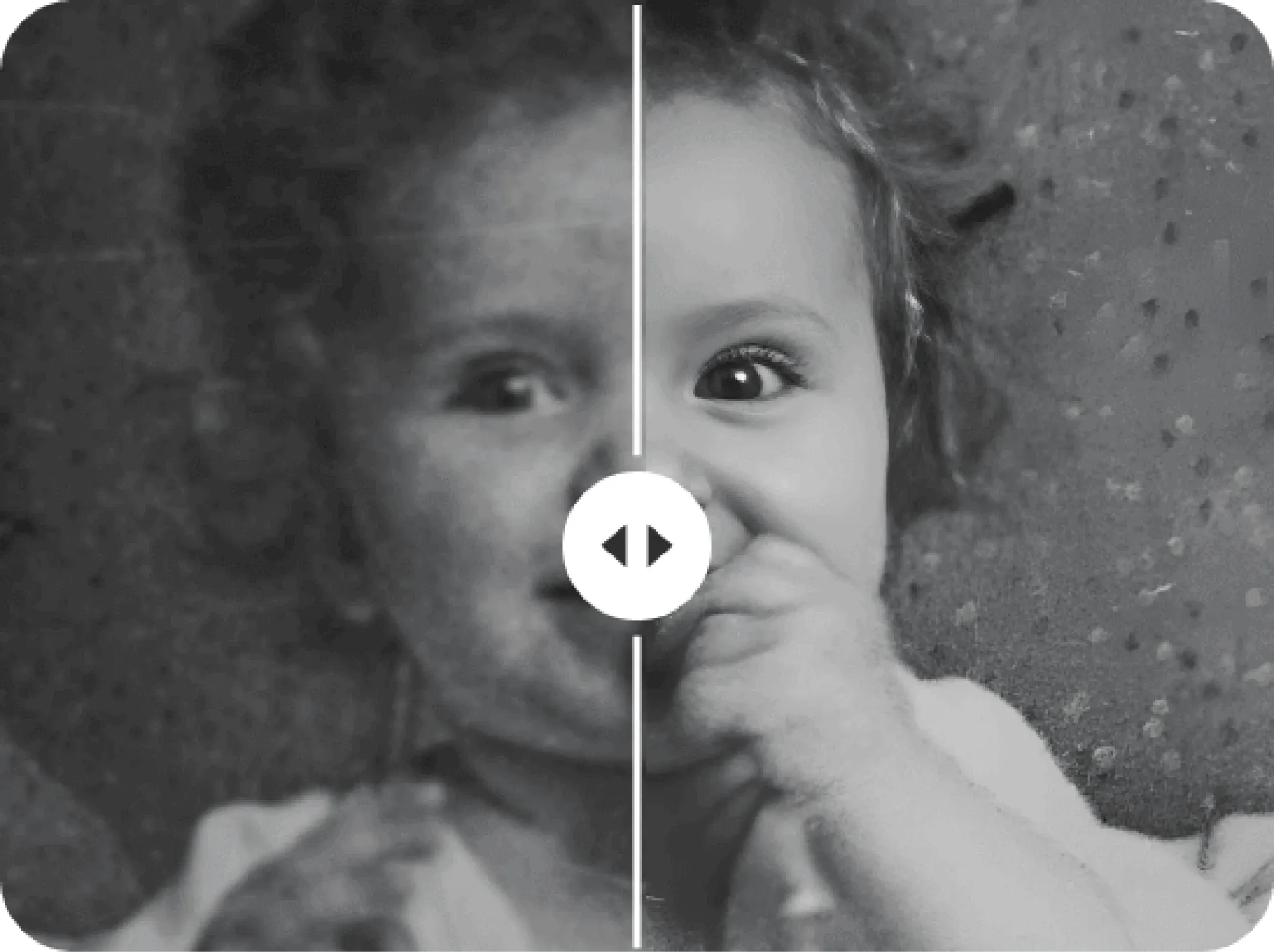
Technical Principles of Old Photo Restoration: How Does AI Turn Blurry Black-and-White Photos into High-Definition?
- Super-Resolution Imaging (Super-Resolution / ESRGAN):Traditional upscaling merely uses simple pixel interpolation, which easily results in blurriness or an unnatural "oil painting" look. AI employs Generative Adversarial Networks (GANs) to learn texture patterns from vast datasets comparing high- and low-resolution images. During enlargement, it "predicts and synthesizes" lifelike microscopic details such as skin pores, hair strands, and fabric fibers.
- Facial Detail Reconstruction Algorithms (GFP-GAN / CodeFormer):The most critical element in old photos is facial expression. Dedicated facial prior models precisely pinpoint facial contours, referencing pre-trained high-resolution facial feature libraries. While preserving original facial proportions, they restore clear catchlights in the eyes and well-defined eyelashes.
- Denoising and Intelligent Image Inpainting:To address mold spots, creases, cracks, and stains, AI automatically analyzes damaged boundaries and uses the geometric and chromatic patterns of surrounding healthy pixels to seamlessly fill in gaps, wiping away the marks of aging.
- Intelligent Black-and-White Colorization (AI Colorization):By identifying visual context (sky, skin tone, architecture, clothing) and matching it against historical color databases, neural networks automatically infuse black-and-white photos with natural, harmonious, and layered color palettes.
Overview of Popular AI Photo Restoration Tools: Features, Pricing, and Comparison
Tool Name | Positioning & Core Strengths | Limitations & Considerations | Pricing Model |
|---|---|---|---|
Remini | Top-tier mobile facial restoration app; quickly turns blurry faces into ultra-clear portraits. | Can occasionally "over-imagine" and deviate from true appearances; background restoration is relatively average. | Free version requires watching ads; Pro subscription costs approx. HK$30–$78 weekly/monthly. |
VanceAI / HitPaw | Versatile online platforms integrating upscaling, scratch removal, facial enhancement, and colorization. | Very few free trial credits; higher cost for bulk processing. | Pay-per-credit or monthly subscription at approx. HK$40–$120. |
Topaz Photo AI | Professional desktop software; delivers exceptionally refined and natural image quality with local processing ensuring privacy. | Requires a computer with a high-performance dedicated graphics card (GPU); expensive license. | One-time perpetual license of approx. US$199 (approx. HK$1,550). |
CodeFormer (Open Source) | Internationally recognized academic open-source algorithm; allows flexible balancing of "fidelity vs. AI detail." | Developer-oriented UI; requires processing and downloading photos individually. | Completely free to use via the Hugging Face web interface. |
Zero-Cost Starter Guide: 3-Step Free High-Definition Photo Restoration
- Step 1: High-Quality Digital Capture (Google PhotoScan Recommended):Avoid photographing prints directly under a desk lamp, which causes glare. Use the free PhotoScan app to capture four alignment dots; it automatically stitches them together, removes surface glare, and corrects angles. If shooting directly with a phone camera, place the photo beside a well-lit window out of direct sunlight and hold the lens completely parallel to the print.
- Step 2: Enhance Faces for Free Using Open-Source CodeFormer:Visit the CodeFormer web app on Hugging Face, upload your photo, and check both "Background Enhance" and "Face Upsample." Set the "Fidelity Weight" between 0.6 and 0.7 to generate a high-definition, watermark-free image while preserving the subject’s authentic appearance.
- Step 3: Color and Tone Adjustments in Your Native Photos App:If the photo is yellowed, slightly adjust the "Color Temperature" toward cooler tones (blue) to neutralize yellowing. Fine-tune "Contrast" and "Black Point" to bring back rich depth and clarity to faded imagery.
Top Professional Recommendation: Capture.HK Photo Digitization and Restoration Services
Capture.HK Core Advantages: An End-to-End Experience from Digitization to HD Archiving
- Patented Album Digitization Technology (Lossless Scanning Without Disassembly):Vintage family albums often use self-adhesive pages where pulling photos off can tear the surface. Capture utilizes patented automated album scanning technology to capture high-definition images page-by-page without removing individual photos, keeping the original albums completely intact.
- Industrial-Grade High-Resolution Optical Sampling:Equipped with professional-grade optical sensors and color calibration systems, Capture scans at high native DPI to accurately capture deep image textures and authentic colors—far exceeding standard flatbed scanners or smartphone captures.
- Intelligent Color Restoration and Quality Calibration:During digitization, Capture's systems automatically optimize exposure, rebalance color, and correct yellowing and dullness, revitalizing long-stored photos with their original vibrant charm.
- Comprehensive Multi-Format Media Support:Beyond standard photo prints and family albums, Capture fully supports digitizing film negatives, slides, and vintage home videotapes (VHS, Hi8, MiniDV).
- Secure Cloud Archiving and Effortless Intergenerational Sharing:Digitized files can be integrated directly into Google Photos or dedicated cloud storage, allowing families to revisit memories across smartphones, tablets, and smart TVs anytime, free from worries about moisture or mold.
Frequently Asked Questions (FAQ) About Old Photo Restoration
Capture Reviews
Capture · Our team
Any Questions?
Feel free to contact
our Memory Specialists
Not sure what format you have or how best to handle it? WhatsApp us and one of the team will take a look.
WhatsApp us