AI Photo-to-Video: How to Make Photos “Come Alive”? (With Recommended Video Generation Tools)

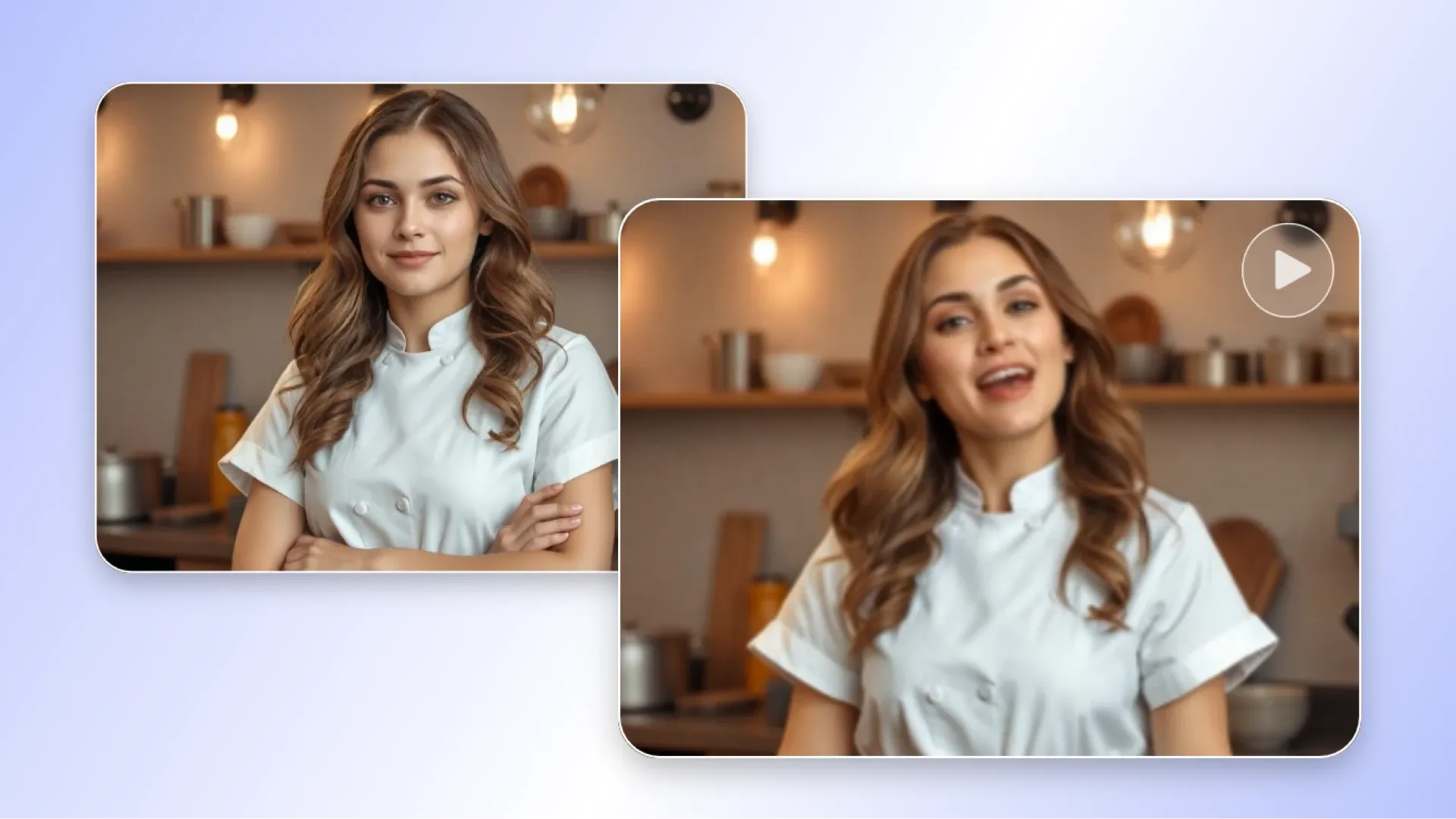
In 2025’s digital era, AI photo-to-video technology is disrupting traditional image processing, allowing static photos to be instantly transformed into vivid videos. With artificial intelligence, creators can effortlessly achieve the effect of “making photos move,” and even generate videos from AI photos for use in social media, memorial videos, or commercial marketing. This innovation not only improves creative efficiency but also expands the influence of content.
The Principles of AI Photo-to-Video
AI photo-to-video refers to the process of using artificial intelligence technology to transform one or more static photos into dynamic videos. Based on deep learning and Generative Adversarial Networks (GANs), AI models learn from massive image datasets, simulate motion trajectories, and make people, scenery, or objects in photos “move.” For example, the LivePortrait tool applies the principle of driving videos, extracting appearance and motion characteristics to generate realistic dynamic effects. Its core lies in image generation technology, where AI interprets facial expressions and body movements, and synthesises sequential frames to create video-like visual continuity.
Compared with traditional video production, AI photo-to-video greatly simplifies the process. Traditionally, multiple photos must be captured and manually edited, but AI requires only one uploaded photo to automatically generate videos lasting seconds to minutes. Technically, AI uses neural networks such as Transformers to analyse pixel distributions of photos and predict possible motion patterns. For example, making someone in a photo move their mouth to speak, or animating clouds in a landscape—these are enabled by large training datasets. By 2025, the technology has matured, supporting high-resolution output for multi-platform sharing.
Advantages and Applications of AI Photo-to-Video
AI photo-to-video brings multiple advantages, starting with improved efficiency and reduced costs. Traditional video production may require professional equipment and teams, but AI tools such as Vidnoz AI can convert photos into videos for free, with options to add music and text. Secondly, it enhances content appeal. Research shows that dynamic videos increase viewing time by more than 30% compared to static photos, which is beneficial for SEO since search engines prioritise rich media content.
In terms of applications, AI photo-to-video is widely used across social media, memorials, and commercial fields. For example, on Instagram or TikTok, users can use the Hicut app to insert photos into templates and instantly create fun videos with one click. In old photo restoration cases, AI can animate photos of deceased loved ones for memorial videos, combining emotion with technology. In business, marketing teams use AI to generate product demo videos, turning static product images into dynamic displays to boost conversion rates. In education, teachers can transform historical photos into videos, revitalising teaching content. Another example is in family applications: parents use Kling AI to generate fun animations of their child, such as breathing fire like a dinosaur. These applications not only expand audience reach but also drive growth in the content economy.
Technical Details Behind Making Photos Move
The core of AI photo animation is enabling static elements to move. Technologies include motion extraction and warping modules. AI learns motions from driving videos and applies them to target photos. For example, Cicero AI’s “Talking Photo” feature allows users to upload a photo and script to generate a video of the person speaking. This relies on deep learning algorithms that train models to mimic real video features and synthesise facial movements.
Another principle is the “Talking Head” model, where AI syncs mouth movements with speech using a given photo and audio, making it appear as if a person is reading aloud. By 2025, tools like DOMO AI V2.4 support conversions for both animation and real-life appearances, including looping animations. This technology is not limited to portraits—it can animate landscapes or objects, such as making rivers flow in photos. Challenges include handling complex backgrounds, but with GAN optimisation, accuracy now exceeds 95%.
Recommended AI Photo-to-Video Tools and Guide

There are many AI photo-to-video tools available, ranging from free to professional options. Vidnoz AI is a popular choice, allowing users to generate videos for free and edit them with added music or text. Stable Video, launched by Stability AI, can transform static images into dynamic clips, producing 14 to 25 frames with resolutions up to 576x1024. RunwayML and DeepBrain are designed for advanced users, supporting functions such as style transfer and AI voiceovers. The international version of Kling AI focuses on producing high-quality short videos and also supports Chinese.
The operation process is straightforward. Users simply upload a photo to a tool platform such as Vidnoz AI, then choose a motion mode or template, for example, making a character move. The AI will automatically generate a video, allowing adjustments to parameters such as speed or background music, before exporting and sharing the result. For mobile users, the InShot App provides a drag-and-drop interface that can quickly turn multiple photos into a video. Professional software such as PowerDirector integrates AI editing features, enabling the creation of complete videos with just one click. Many of these tools also support batch processing, making them especially suitable for content creators.
Challenges and Future Trends
Despite advancements, AI photo-to-video still faces challenges, such as privacy issues and unstable generation quality. In noisy or low-resolution images, AI may introduce distortions. Copyright is another concern; original photo sources must be considered when generating videos.
Looking to the future, with model evolution (like Sora), AI photo-to-video will become smarter, supporting contextual understanding and multimodal inputs. By 2030, it is predicted that 90% of social media content will be AI-generated. AR/VR integration will create even more immersive videos in virtual reality environments. In 2025, tools like Nim began offering free AI video generation covering text-to-video and image-to-video, pushing further toward the democratisation of global content creation.
Preserve Your Precious Memories with Capture’s Photo Album Digitisation Service
Do you have a box full of old photographs, worried that they may fade or get damaged over time? Now, you can preserve these treasured memories by digitising them with Capture.HK’s professional photo album digitisation service. Our service allows you to convert your old photos into high-quality digital files, ensuring they are safely stored and easily shareable.
At Capture.HK, we use high-resolution scanning technology to restore your photos with sharp details and vibrant colours, maintaining their original quality. We also offer various file formats, making it easy for you to access and share them across different devices. Most importantly, we handle your photos with utmost care, ensuring they are safely processed and preserved.
The Frame Digital Photo Frame
Want to relive your digital memories every day? Capture’s The Frame digital photo frame is the perfect solution! Designed to showcase your most cherished moments, The Frame allows you to display a lifetime of memories in one elegant frame.
With its sleek design and high-resolution display, The Frame offers an effortless way to organise and enjoy your favourite photos. Simply digitise your photo collection, upload them to The Frame, and enjoy your memories anytime, anywhere.
Whether placed in the living room, bedroom, or office, The Frame adds a touch of warmth and personality to your space. More than just a decorative item, it’s a meaningful gift that brings your treasured moments to life.
Get The Frame today and enjoy your memories every day!
References:
- How Does AI Make Facial Expressions in Photos Move - Zhihu
- Generative AI for Images (Part 1) - HackMD
- How to Make People in Photos Move? Chanjing AI Brings Static Images to Life - Chanjing AI
- Making Photos of the Deceased Move: The Fusion of Technology and Humanity - 1314520
- [AI Photo-to-Video Tutorial] Incredible! The Strongest Model Yet, Works for Anime & Real Life - YouTube
- [Play AI] How Are Old Photos Animated on Social Platforms? - YouTube
- AI Video Generation: Three Takeaways and Parent-Child Application Examples - Facebook
- Vidnoz AI Image-to-Video - Vidnoz
- Don’t Learn the Last One... The Simplest AI Video Generation App “Hicut” - Instagram
- Why Are AI Image Generation & Video Production the Next Big Thing? - JuicySuite
- [2025] Six Best AI Video Generators - Genape
- Top 10 Recommended Photo-to-Video Software/Apps in 2025 - Movavi
- Latest Free AI Video Generators 2025 - YouTube
- 15 AI Tools: From Text and Images to Video Generation - Future Commerce
- [2025] Top 3 Recommended AI Video Generators - HitPaw
Extended Readings:
Capture Reviews
Related Articles
You may also like these articles





Capture · Our team
Any Questions?
Feel free to contact
our Memory Specialists
Not sure what format you have or how best to handle it? WhatsApp us and one of the team will take a look.
WhatsApp us