[Photo to Cartoon] How to Use AI Apps/Tools to Turn Photos into Animations or Cartoons? (With Tutorial)


Amid the wave of digital creation in 2025, AI photo-to-cartoon technology has become a leading trend, allowing ordinary photos to be instantly transformed into lively cartoons. Through artificial intelligence, users can easily achieve photo-to-cartoon effects, and even use photo-to-cartoon apps to generate dynamic videos. This tool not only adds fun but also enhances social media sharing, becoming an indispensable asset for creators.
The Principles of AI Photo-to-Cartoon
AI photo-to-cartoon refers to the process of using artificial intelligence to convert static photos into cartoon-style images. The technology is based on Generative Adversarial Networks (GANs) and deep learning models. AI analyses outlines, colours, and textures in photos, and simulates cartoon drawing styles, such as Disney or Studio Ghibli effects. Technically, AI trains on large cartoon datasets to learn how to simplify details, emphasise contour lines, and add exaggerated expressions to “cartoonise” photos.
For example, Canva’s AI Cartoon Generator can convert photos into cartoons for free, supporting multiple style outputs. Compared with traditional hand-drawing, AI photo-to-animation greatly accelerates the process — simply upload a photo, and AI will automatically process it into high-quality results. By 2025, the technology has evolved to support dynamic conversion, turning static photos into simple animations, such as a character blinking or scenery moving, through motion capture algorithms that synthesise sequential frames. This is not limited to portraits but also applies to pets and landscapes, expanding its range of applications.
Advantages and Applications of AI Photo-to-Cartoon
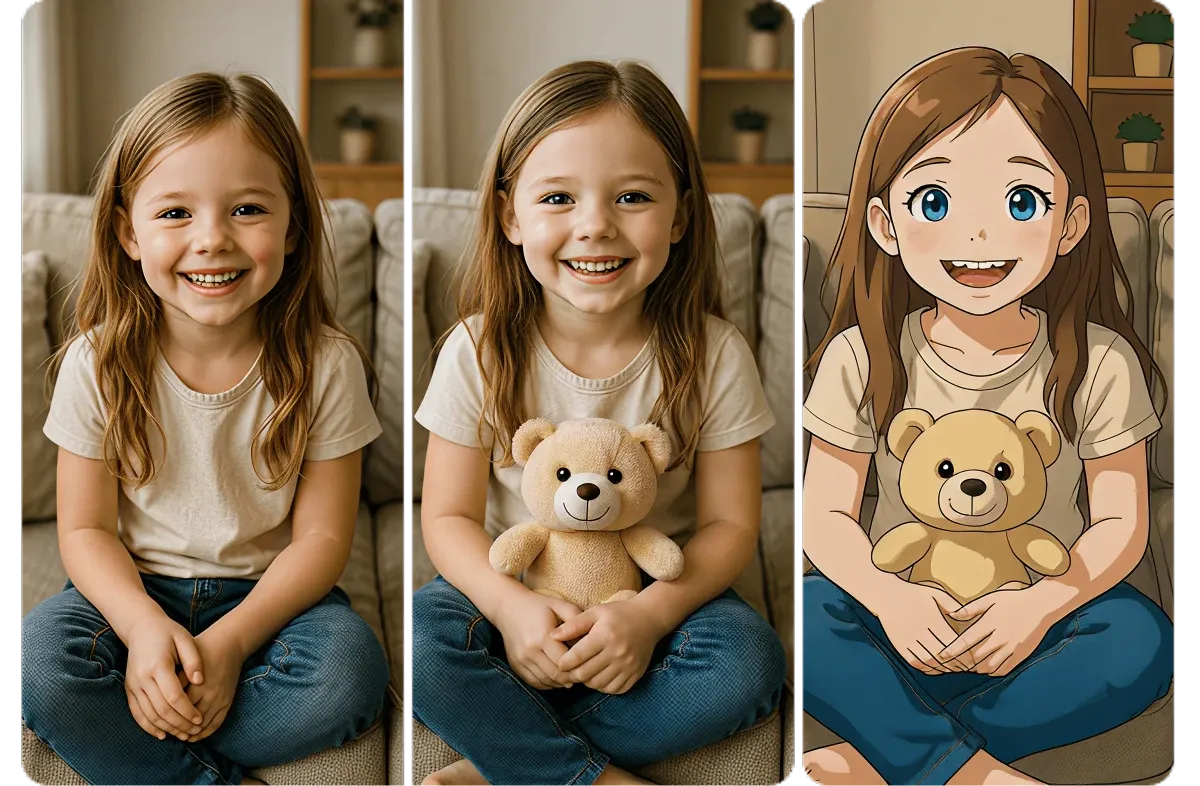
AI photo-to-cartoon comes with significant advantages, most notably ease of use and cost effectiveness. Traditional cartoon illustration requires artistic skills, but AI tools such as ToonMe App use algorithms to instantly generate hand-drawn-style portraits, suitable for non-professionals. Another advantage is increased content appeal: studies show that cartoonised photos can boost social media engagement by more than 25%.
Applications span across social media, marketing, and entertainment. For example, on Instagram, users can apply ToonApp to turn photos into cartoons and add filters such as AI clay or pixel effects, creating viral content. In business, brands use Monica AI to convert product photos into cartoon style to make ads more engaging. In education, teachers use DomoAI to turn historical photos into animations, making lessons more interactive. In parent-child applications, parents use Pollo AI to transform children’s photos into cartoon animations for making personalised storybooks. These applications not only add fun but also drive the growth of the digital content economy.
Technical Details of Photo-to-Animation
AI photo-to-animation focuses on further animating cartoonised photos. The technical principle involves image animation generators, where AI extracts features such as facial keypoints from static images, then applies motion models to synthesise animations. For example, with EaseMate AI Image Animator, users can upload photos and enter text prompts to generate animated videos. This relies on neural networks predicting motion trajectories, making cartoon characters “come alive.”
Another key technique is lip-sync and facial animation. Tools such as KomikoAI can turn comics or photos into animated videos with lip synchronisation support. By 2025, Adobe Firefly integrates AI animation generation, enabling quick production of 2D or 3D content from photos. The main challenge lies in handling complex backgrounds, but with advanced GAN optimisation, accuracy has surpassed 90%. This technology not only supports cartoonisation but can also add AR elements, turning photos into interactive animations.
Recommended Photo-to-Cartoon Apps and Steps
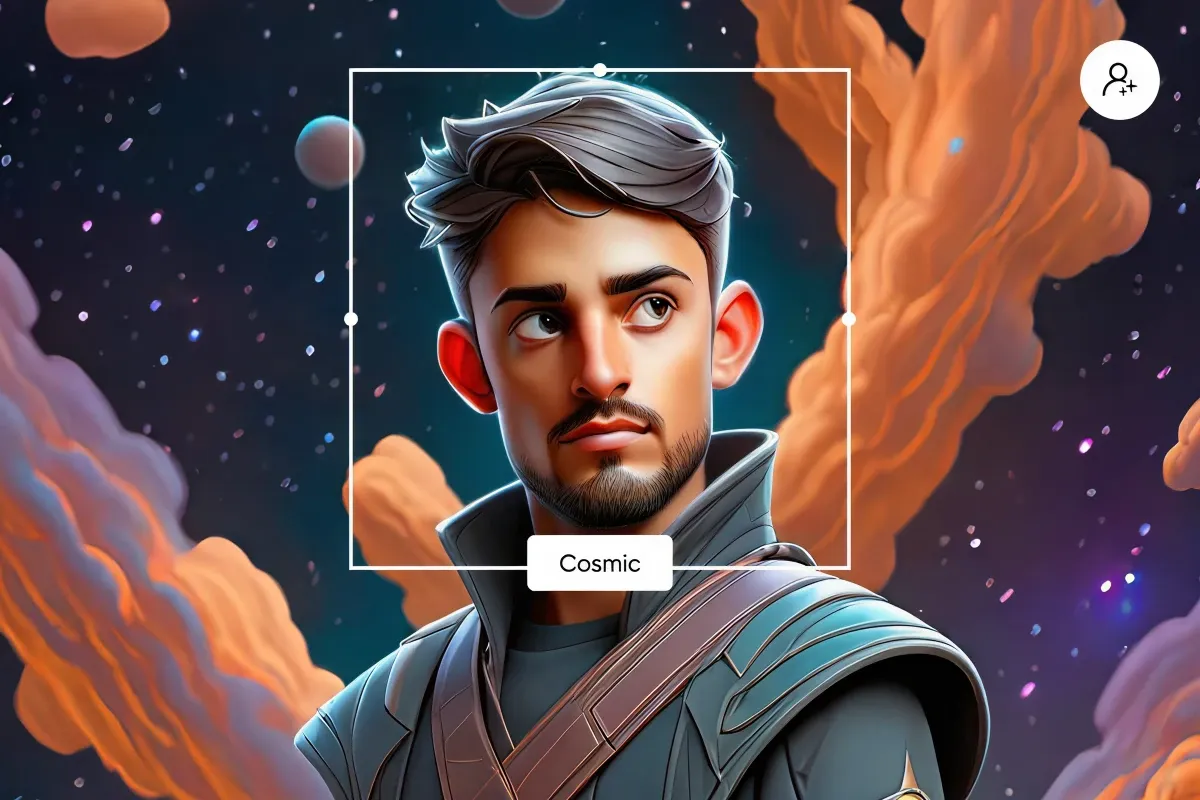
There is a wide variety of photo-to-cartoon apps, from free to professional tools. ToonMe is a popular choice, available on iOS and Android, instantly generating cartoon portraits. PhotoDirector uses AI for precise photo-to-cartoon conversion, suitable for beginners. Fotor offers free online conversions, even supporting pets and landscapes. YouCam Perfect allows users to apply cartoon filters to photos for easy sharing on social media. Picsart’s AI Cartoon Generator transforms portraits instantly.
Step-by-Step Guide
- Download an app such as ToonApp.
- Upload a photo and select a cartoon style, such as comic or Disney.
- AI automatically generates the result; users can adjust details like colours or animation effects.
- Export and share.
For animation, MyEdit supports AI templates such as kisses or hugs, turning static cartoons into animations. Many of these apps offer free trials and batch processing to increase efficiency.
Challenges and Future Trends
Although AI photo-to-cartoon technology is mature, challenges remain, such as copyright issues and inconsistent generation quality. In low-light photos, AI may produce distortions. Privacy is another concern, since cloud-based apps require data security considerations.
Looking ahead, 2025 AI trends include VR/AR integration, allowing cartoonised photos to become immersive experiences, like stepping into a cartoon world. 3D cartoon styles and personalisation will become popular, with AI generating Ghibli-style or Chibi characters. By 2030, it is expected that 90% of social media content will be cartoonised by AI, with real-time rendering further driving innovation. New trends such as the AI “Squish Effect” will add playful possibilities and broaden applications.
Preserve Your Precious Memories with Capture’s Photo Album Digitisation Service
Do you have a box full of old photographs, worried that they may fade or get damaged over time? Now, you can preserve these treasured memories by digitising them with Capture.HK’s professional photo album digitisation service. Our service allows you to convert your old photos into high-quality digital files, ensuring they are safely stored and easily shareable.
At Capture.HK, we use high-resolution scanning technology to restore your photos with sharp details and vibrant colours, maintaining their original quality. We also offer various file formats, making it easy for you to access and share them across different devices. Most importantly, we handle your photos with utmost care, ensuring they are safely processed and preserved.
The Frame Digital Photo Frame
Want to relive your digital memories every day? Capture’s The Frame digital photo frame is the perfect solution! Designed to showcase your most cherished moments, The Frame allows you to display a lifetime of memories in one elegant frame.
With its sleek design and high-resolution display, The Frame offers an effortless way to organise and enjoy your favourite photos. Simply digitise your photo collection, upload them to The Frame, and enjoy your memories anytime, anywhere.
Whether placed in the living room, bedroom, or office, The Frame adds a touch of warmth and personality to your space. More than just a decorative item, it’s a meaningful gift that brings your treasured moments to life.]
Get The Frame today and enjoy your memories every day!
References:
- Photo to Cartoon - Canva
- ToonMe AI Cartoon Photo Editor - App Store
- Cartoon Photo Editor - Google Play
- Cartoon Yourself: Best Software - CyberLink
- AI Image Animator - EaseMate
- Photo to Cartoon Tool - Monica AI
- Image Animation Tool - DomoAI
- Animate a Picture - Pollo AI
- AI Animation Generator - Adobe Firefly
- Animate Photo Editor - MyEdit
- Photo to Cartoon - Fotor
- How to Cartoonize a Picture - Perfect Corp
- Photo to Cartoon Effects - Picsart
- Top Animation Trends 2025 - Animation Iconic
- AI Design Trends for Social Media - Stockimg AI
- 16 Animation Trends to Watch in 2025 - GarageFarm
- AI Image Art Trends - CyberLink
Extended Readings:
Capture Reviews
Related Articles
You may also like these articles


Capture · Our team
Any Questions?
Feel free to contact
our Memory Specialists
Not sure what format you have or how best to handle it? WhatsApp us and one of the team will take a look.
WhatsApp us