Online Photo Quality Restoration Tool MyEdit: User Guide, Pricing, and Reviews


Digitising your own collection? Loose Photo Scanning in Hong Kong — prices and service details
With the rapid development of AI technology, photo quality restoration is no longer exclusive to professionals. Many old photos become blurry, faded, or full of noise due to the passage of time, and low‑resolution images often lose detail when enlarged. “MyEdit” (https://myedit.online/) is a free online AI image editing platform launched by CyberLink, focusing on one‑click image enhancement and restoration. It can automatically deblur, reduce noise, upscale resolution, and even restore colors and details in old photos, while also integrating features such as object removal and background replacement. No software download is required—everything works directly in the browser—making it ideal for restoring family photos, optimising social media images, or professional use. As a free tool, it offers daily credit allowances so users can easily experience the power of AI. This article introduces MyEdit’s core features, usage steps, pricing model, and real user feedback, helping you quickly master this powerful online tool and bring clarity and beauty back to your photos.
What Is “MyEdit”?
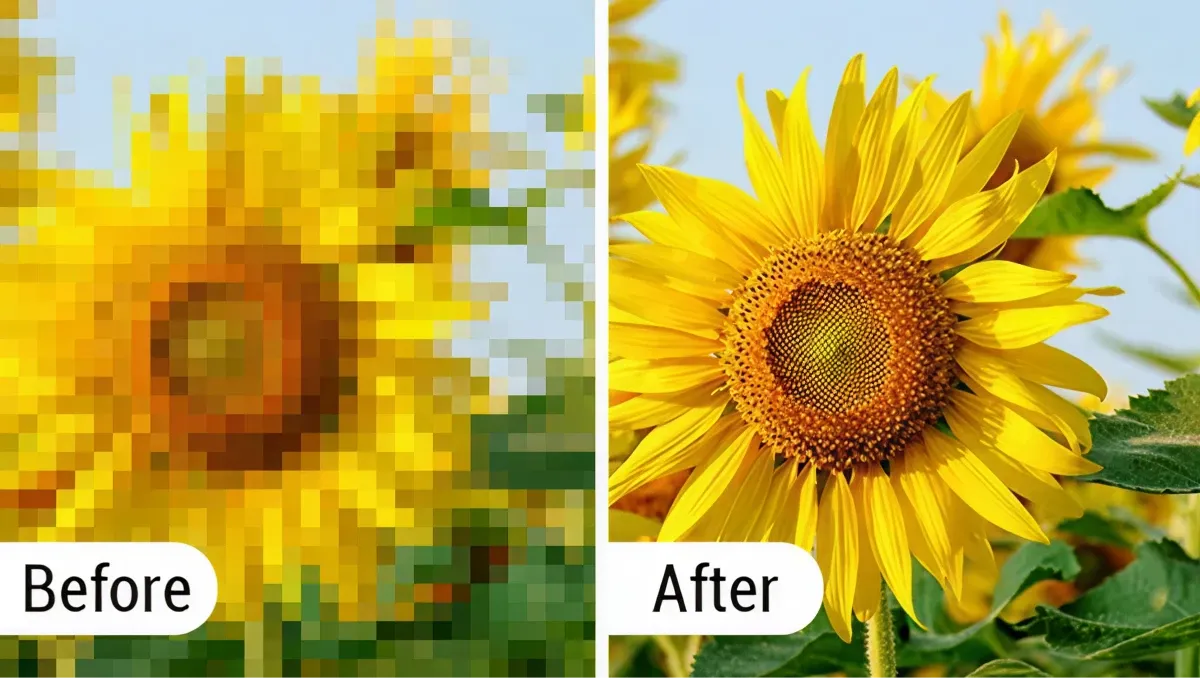
“MyEdit” is an all‑in‑one online AI creation tool developed by CyberLink, covering image, audio, and video editing, with particularly strong photo quality restoration features. The platform integrates advanced AI models to handle deblurring, denoising, resolution upscaling, and old photo restoration.
Core features include:
AI Image Enhancement: One‑click resolution increase, detail sharpening, and colour and contrast optimisation.
Deblur and Denoise: Automatically corrects blur and grain caused by camera shake or low‑light conditions.
Old Photo Restoration: Revives faded colours and removes scratches, bringing old photos back to life.
Additional Tools: Object removal, background replacement, AI generation, and more for further creative editing after restoration.
MyEdit emphasises natural results and avoids an overly artificial look, making it suitable for both beginners and professionals. Compared with traditional software, it runs in the cloud, works seamlessly across devices, and regularly updates its AI models. Whether restoring childhood photos or enhancing product images, it delivers professional‑level results quickly.
MyEdit User Guide
MyEdit is easy to use and can be tried without registration. Below are the detailed steps for photo quality restoration:
Visit the website: Open your browser and go to https://myedit.online/en/photo-editor, then choose tools such as “Image Enhancer,” “Deblur,” or “Photo Restoration.”
Upload a photo: Click the “Upload” button and select an image from your computer or phone. JPG, PNG, and other formats are supported.
AI automatic processing: After uploading, the AI starts analyzing and restoring the image. This usually takes a few seconds to tens of seconds, and before‑and‑after comparisons are shown.
Adjust and download: If fine‑tuning is needed (such as intensity), some tools offer manual sliders. Once satisfied, click “Download.” The free version may have limitations.
Advanced tips:
Use the “Deblur” tool first for extremely blurry photos.
Combine “Photo Restoration” with denoising for old photos.
Batch processing requires the Pro version.
The entire process is intuitive and efficient, making it ideal for quick restorations.
How Much Does MyEdit Cost? Is There a Free Version?
Yes, MyEdit offers a free version with daily credit allowances (about 3–10 credits, depending on updates), enough to try basic restoration features such as image enhancement or deblurring. No registration is required, but downloads may include watermarks or lower resolution.
Paid plans unlock unlimited credits, no watermarks, high resolution, and more tools:
Monthly subscription: Starts at around USD $4–12 (Image Plan), depending on features.
Annual subscription: More cost‑effective, often with discounts.
Additional credit packs can be purchased separately.
Subscriptions are handled through the website, support credit cards, and can be canceled at any time. New users often receive bonus credits. The free version is already very practical for occasional use, while frequent or commercial users are recommended to upgrade. Overall, it offers excellent value and is a great entry‑level AI restoration option.
Real User Reviews of MyEdit (Selected)
MyEdit has received positive feedback on online forums and review sites, with users praising its simplicity and powerful AI results. Below are selected real comments (from Reddit, G2, and blogs, anonymised):
“The interface is super simple, and the AI denoising and upscaling are amazing! The free daily credits are enough to restore several old photos—much better than other tools.” (2025 user, 5 stars)
“A lifesaver for restoring old photos. One click turns yellowed, blurry images into clear and natural results. Much easier than Photoshop, perfect for beginners.” (Blog review, 4 stars)
“The free credits are useful, and the restored details look natural. Large files can be slow sometimes, but overall highly recommended.” (G2 user, 4 stars)
Negative feedback:
“Free credits are limited; once used up, you have to wait or pay. Sometimes there’s a slight watermark.” (3 stars)
“The AI is strong, but extremely damaged photos still need manual help. The web interface is smoother than the app version.” (4 stars)
Most users consider MyEdit one of the best free online AI photo quality restoration tools, with natural results and convenient operation—especially suitable for restoring cherished memories.
In summary, with its free entry point, powerful AI, and no‑installation advantage, MyEdit has become a popular choice for photo restoration. Whether revisiting old memories or enhancing new creations, it delivers professional results. Visit the website and give it a try—bring your photos back to life!
Preserve Your Precious Memories with Capture’s Photo Album Digitisation Service
Do you have a box full of old photographs, worried that they may fade or get damaged over time? Now, you can preserve these treasured memories by digitising them with Capture.HK’s professional photo album digitisation service. Our service allows you to convert your old photos into high-quality digital files, ensuring they are safely stored and easily shareable.
At Capture.HK, we use high-resolution scanning technology to restore your photos with sharp details and vibrant colours, maintaining their original quality. We also offer various file formats, making it easy for you to access and share them across different devices. Most importantly, we handle your photos with utmost care, ensuring they are safely processed and preserved.
The Frame Digital Photo Frame
Want to relive your digital memories every day? Capture’s The Frame digital photo frame is the perfect solution! Designed to showcase your most cherished moments, The Frame allows you to display a lifetime of memories in one elegant frame.
With its sleek design and high-resolution display, The Frame offers an effortless way to organise and enjoy your favourite photos. Simply digitise your photo collection, upload them to The Frame, and enjoy your memories anytime, anywhere.
Whether placed in the living room, bedroom, or office, The Frame adds a touch of warmth and personality to your space. More than just a decorative item, it’s a meaningful gift that brings your treasured moments to life.
Get The Frame today and enjoy your memories every day!
References:
MyEdit - listmyai
MyEdit's Review - Features, Pricing & Deals - toolsforhumans.ai
MyEdit — AI Image Tool - aitools
MyEdit: free online AI image and audio editing tool - kdjingpai
Myedit Photo Editor - aiforeveryone
MyEdit - agenthunt
Extended Readings:
Capture Reviews
Related Articles
You may also like these articles








Capture · Our team
Any Questions?
Feel free to contact
our Memory Specialists
Not sure what format you have or how best to handle it? WhatsApp us and one of the team will take a look.
WhatsApp us Free quote